

voice
How to Save Voice Messages on iPhone
On an iPhone, audio messages in Messages expire two minutes after you listen to them unless you tap Keep. To save them for good, change one setting so they never expire, or save the ones that matter to Voice Memos and back them up.
Below you’ll find each step, how to do the same with WhatsApp voice notes, and how to keep a voice you never want to lose.
Which option do you need?
Tap “Keep”
Saves one audio message inside the chat, right after you play it.
Expire: Never
Stops every future audio message from disappearing.
Save to Voice Memos
Turns a message into an audio file you can name, share and back up.
WhatsApp voice notes
They don’t expire, but you can save them as files too.
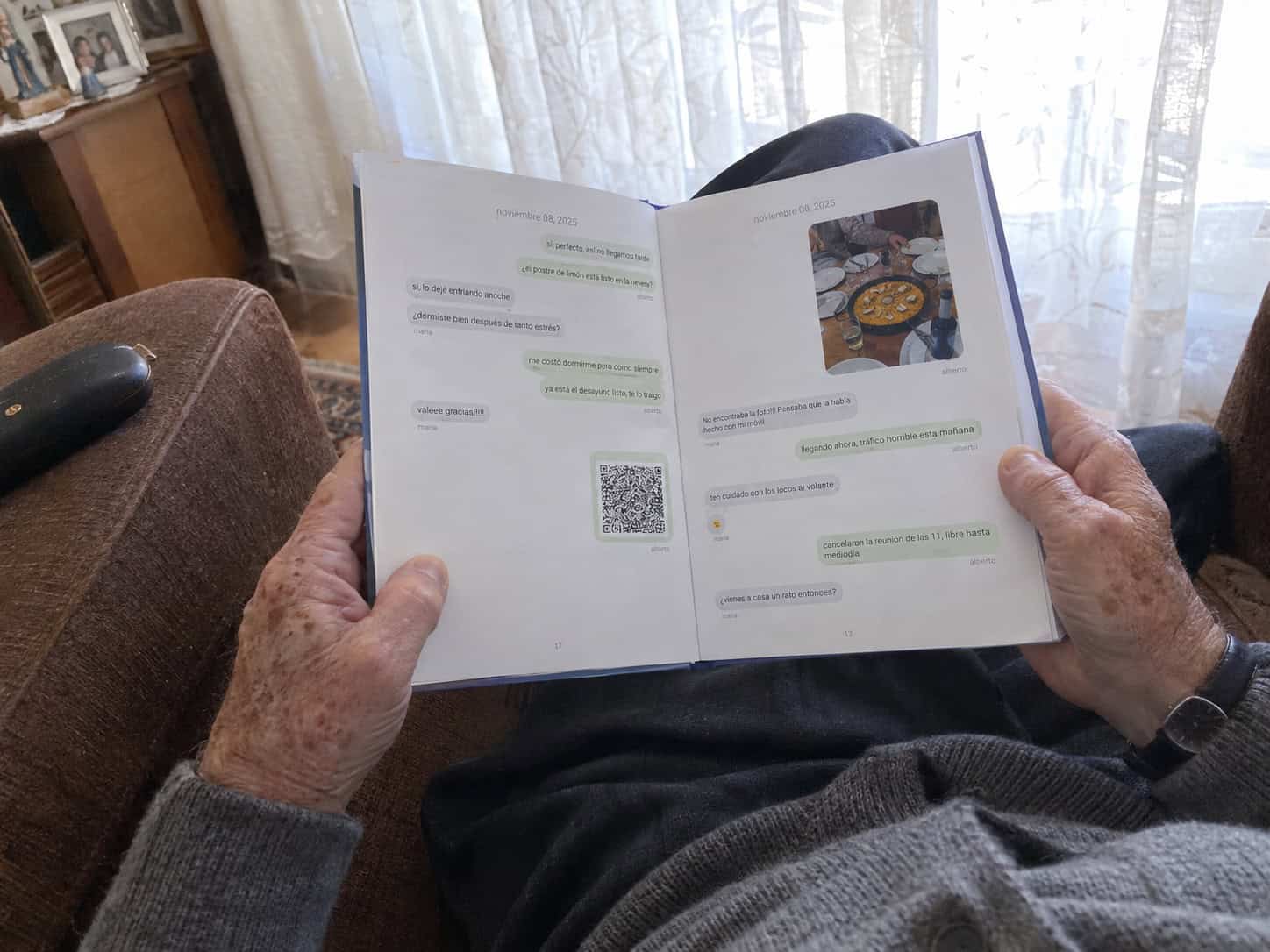
In a printed book
Each voice note becomes a QR code next to its message.
Why do voice messages disappear on iPhone?
By default, the Messages app deletes audio messages two minutes after you play them, to save space. A small Keep button shows up under each one while you still have time. If you miss it, the message is gone.
How to stop audio messages from expiring
-
Open the Messages settings
Go to Settings›Apps›Messages. On older versions of iOS, it’s Settings›Messages.
-
Find Audio Messages
Scroll down to the Audio Messages section and tap Expire.
-
Choose Never
Pick Never. From now on, audio messages stay in the chat until you delete them.
Audio messages take up space. If your iPhone is nearly full, save the important ones as files (below) instead of keeping all of them.
How to save one voice message to your iPhone
-
Play it to the end
Listen to the whole message. Then tap Keep under it so it doesn’t expire.
-
Save it as a file
Press and hold the audio message and tap Save to Voice Memos.
-
Find it in Voice Memos
Open the Voice Memos app: the message is at the top of the list. Give it a name, like “Grandma, my birthday 2026”.
-
Back it up
In Voice Memos, tap the recording, tap the ••• button and choose Share to save it to Files, email it to yourself or AirDrop it to your Mac.
When you keep an audio message, the person who sent it may see a small “Kept” note under it.
How to save WhatsApp voice messages on iPhone
WhatsApp voice notes don’t expire on their own (unless the chat uses disappearing messages), but they’re lost if you delete the chat or change phones without a backup.
-
Press and hold the voice note
Open the chat, press and hold the voice message and tap Forward.
-
Tap the share icon
Instead of choosing a contact, tap the share icon in the bottom-right corner.
-
Save it
Choose Save to Files, or send it to yourself by email.
For every voice note in a chat at once, export the chat with media: you get the text and all the audio files together. Here’s how to export a WhatsApp chat on iPhone.
our favorite
And if it’s a voice you never want to lose?
A file on your phone is easy to forget. In a message book, each voice note is printed as a QR code right next to the message it belongs to: scan it with any phone and you hear that voice again, in the middle of the conversation.
We keep the voice notes and videos for 10 years with the printed book. It works today with WhatsApp, Messenger, Instagram and Telegram. Books from iMessage are coming soon.
Tips to keep voice messages safe
Name them
“Mom, first day of college” is much easier to find in ten years than “New Recording 14”.
Keep two copies
One in iCloud or Files, one on a computer or a drive. Phones get lost.
Back up before you switch phones
Messages in iCloud and a WhatsApp backup move your voice notes to the new phone.
Ask before you share
A voice message is personal. Check with the person before you play it for others.
Keep reading
- How to keep the messages of a loved one
- How to print your iMessages
- How to export a WhatsApp chat on iPhone
- How to recover a WhatsApp chat
- How to print a WhatsApp conversation
Frequently asked questions
How do I keep audio messages on my iPhone forever?
Go to Settings › Apps › Messages (or Settings › Messages on older iOS), tap Expire under Audio Messages and choose Never. To have a copy outside the chat, press and hold the message and tap Save to Voice Memos.
Where do saved audio messages go on iPhone?
When you tap Save to Voice Memos, the message goes to the Voice Memos app, at the top of the list. If you only tap Keep, it stays inside the conversation in Messages.
Why did my voice message disappear?
Audio messages are set to expire two minutes after you play them. If you didn’t tap Keep in time, the message is deleted. Change Expire to Never so it doesn’t happen again.
Can I recover an expired audio message?
Usually not from the Messages app. An older iPhone backup made before the message expired may still contain it.
How do I save a WhatsApp voice message on iPhone?
Press and hold the voice note, tap Forward, then the share icon in the bottom-right corner, and choose Save to Files.
Can voice messages be printed?
Not as sound on paper, but in a message book each voice note becomes a QR code next to its message, so anyone can scan it and listen again.
Some voices you’ll want to hear again in twenty years. Keep them.