

How to print a WhatsApp conversation: 4 ways, step by step
For paperwork, to reread it calmly or to give it as a gift. Here is how to print a WhatsApp conversation from your phone or computer, for free or as a book, and what works (and what does not) in each case.
To print just a few WhatsApp messages, take screenshots and print them from your gallery. For a whole conversation, use “Export chat” on your phone, open the _chat.txt file on your computer and print it. If you want the photos and voice notes in place, turn it into a designed PDF or a book.
Print WhatsApp messages from your phone with screenshots
It is the quickest option if you only need a few messages. A screenshot also shows the chat exactly as it is: the contact photo, the bubbles and the time.
Press power + volume down. Many phones show “Capture more” or “scrolling screenshot”, which extends the capture as you scroll down the chat. Then, in the gallery: ⋮ › Print.
Press side button + volume up. WhatsApp does not support long screenshots, so take several in a row. To print: Photos › Share › Print, with an AirPrint-compatible printer.
Beyond a few screens, it is not worth it. For a long conversation, screenshots take forever: go to way 2.
Print a whole WhatsApp conversation at home
WhatsApp has no “print” button, but it does have “Export chat”, which puts every message into a text file. With that file on your computer, printing is easy:
Export the chat from your phone
If you only want to print the text, choose “Without media”: it is smaller and arrives faster. We have a guide for each phone: export a WhatsApp chat on Android and export a WhatsApp chat on iPhone.
Send it to your computer
Email it to yourself or save it to Google Drive or iCloud. On iPhone it arrives as a .zip: double-click to unzip it.
Open the _chat.txt file
Open it with Word or Google Docs, not Notepad, so you can change the formatting before printing.
Adjust the formatting to save paper
10 or 11 pt font, narrow margins and double-sided printing. With “Find and replace” you can remove repeated text such as “<Media omitted>”.
Ctrl + P (or Cmd + P on a Mac) and you are done. Check the preview: a chat spanning years can run to hundreds of pages.
It cannot be done from WhatsApp Web. Neither WhatsApp Web nor the desktop app can export or print chats: you always have to start from your phone, as the WhatsApp Help Center explains.
Print a WhatsApp conversation as a PDF or a book
The text file is fine for reference, but it looks nothing like the chat: no bubbles, no photos, no voice notes, and every line starts with a date and time. If the conversation is a keepsake, there is a better way: upload the same exported file (this time with media) and turn it into a real book.
Text at home
- Instant
- The whole conversation
- No photos, bubbles or formatting
- Loose sheets
Designed PDF
- Laid out like a book, with photos
- Voice notes and videos as QR
- Instant delivery, print it wherever you like
- You handle the printing
Printed book
- Premium print, softcover or hardcover
- Printed photos and voice notes as QR
- Cover, dedication and chapters
- Delivered in a few days
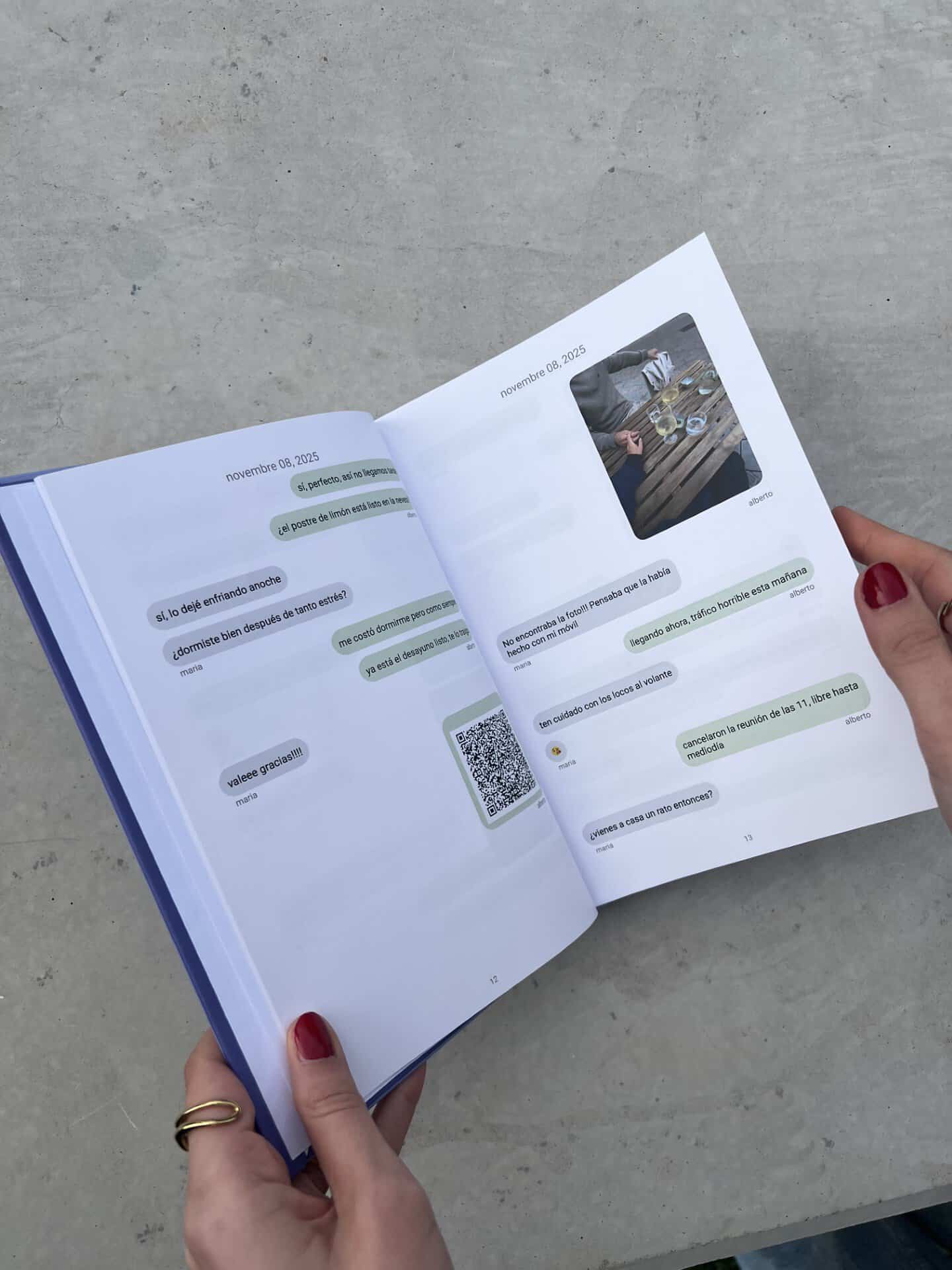
What a message book includes
- Upload the file exported from WhatsApp at app.milibrodemensajes.com.
- Choose the messages: remove what you do not want, fix typos and split into chapters.
- Design the book: cover, colours, fonts and dedication.
- Get it delivered in a few days. Extra copies to give away are 20% off.
Which way of printing WhatsApp suits you?
| Screenshots | Text at home | Designed PDF | Printed book | |
|---|---|---|---|---|
| Best for | a few messages | checking the whole chat | keeping and sharing it | keeping or giving it |
| Looks like the chat | yes | no | yes | yes |
| Photos | only those on screen | no | yes | yes |
| Voice notes and videos | no | no | as QR | as QR |
| Price | free | free | €12.99 | from €24.99 |
What if you need it as evidence?
If you want to print a WhatsApp conversation for court or a police report, bear in mind that a screenshot or printout can easily be challenged. It is common to back it up with a notarised statement (a notary certifies what is on your phone) or a digital forensics report, and never to delete the original conversation from the phone.
This is general information, not legal advice: ask a lawyer about your case. A message book is designed as a keepsake, not as evidence.
Frequently asked questions
How do I print WhatsApp messages from my phone?
For a few messages, take screenshots and use the “Print” option in your gallery (Android) or in Photos with AirPrint (iPhone). For a whole conversation it is better to export the chat and open the file on your computer.
Can I print a WhatsApp conversation from WhatsApp Web?
Not directly. WhatsApp Web and the desktop app have no option to print or export chats. Export the conversation from your phone and open the file on your computer.
Can I print the photos from the chat?
When you print the text file at home, the photos do not appear: you only see the file name. To have messages and photos together, in place, you need a designed PDF or a book.
How much does it cost to print a WhatsApp chat?
Printing the text file at home is free. With Mi Libro de Mensajes, the designed PDF costs €12.99 and the printed book starts at €24.99; the final price depends on the number of pages, the cover and the paper.
How many pages will my book have?
It depends on the length of the chat and the messages you choose to include. A book can have between 32 and 800 pages, and you can calculate the price before ordering.
Can I print a group chat?
Yes. Group chats print just like one-to-one chats and each person appears with their name.
Does anyone read my messages?
No. The process is automatic, the data is stored on servers in the European Union and the chat content is deleted once the book is printed.
Can I print Telegram or Instagram chats?
Yes, as well as WhatsApp you can create a book from Telegram and Instagram conversations.